
Android TV
pxtv — Import from a Subscription Page
Section titled “pxtv — Import from a Subscription Page”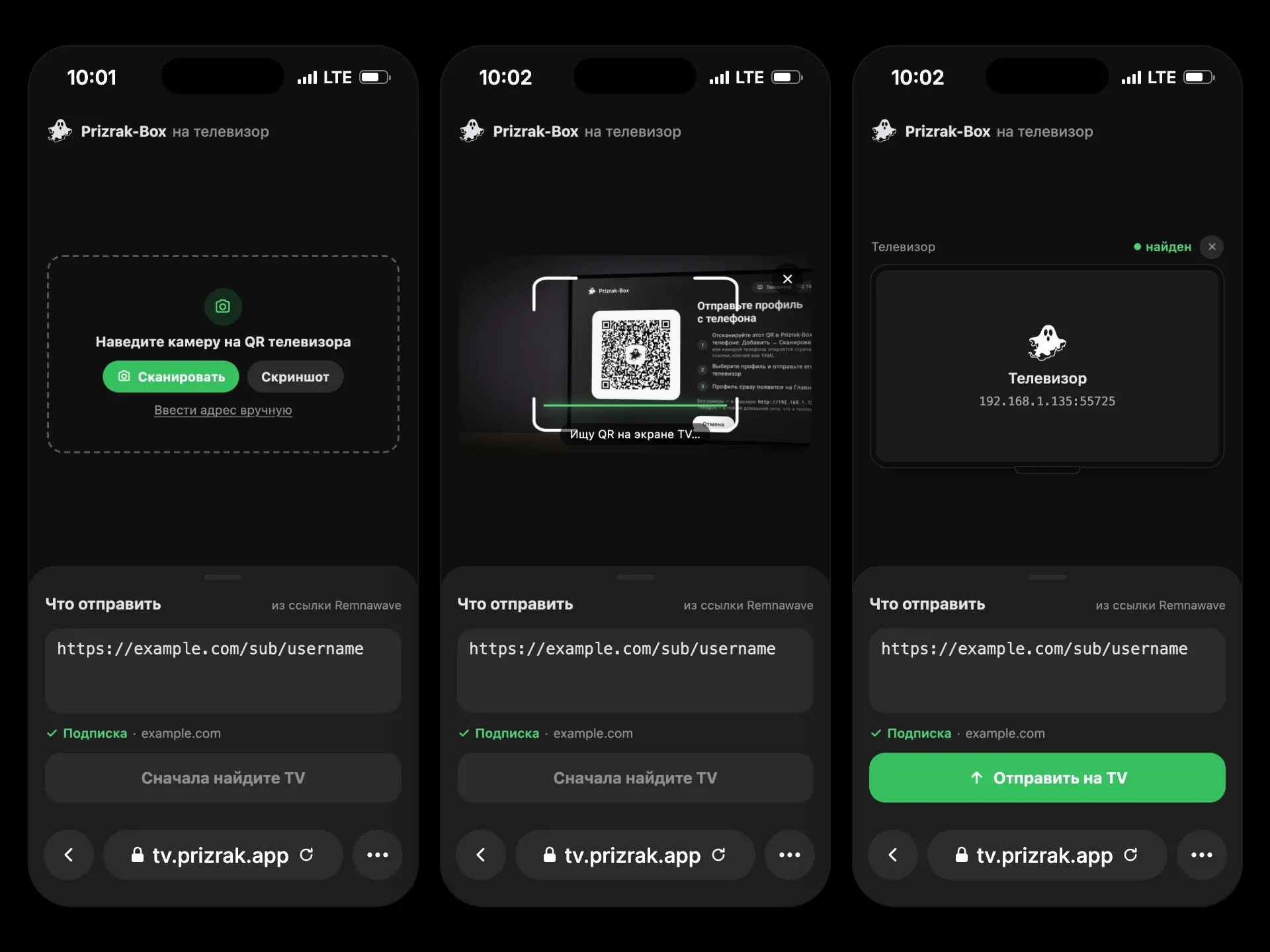
pxtv is a companion web page for Prizrak-Box on Android TV and Apple TV.
Its main purpose: let users send a subscription from their provider’s web page to the TV — without typing long URLs with a remote.
The workflow:
- The user opens the import screen on the TV (Add Profile → From another device; on Apple TV Receive from a device). The TV shows a QR code.
- On the phone, they open pxtv from your subscription page — the link is already filled in.
- They tap Scan and point the camera at the TV’s QR code (a screenshot or the TV’s address typed by hand also works).
- Send to TV opens the TV’s own page, which sends the profile. The TV adds it at once and opens Home.
The phone and the TV must be on the same home network (the TV on Wi-Fi or cable), and the VPN on the TV must be off — the TV asks for that itself. pxtv only opens the TV’s page: the profile goes from the phone straight to the TV and never passes through pxtv’s server.
Link Parameters
Section titled “Link Parameters”| Parameter | Meaning |
|---|---|
url | The subscription link (or keys, or YAML), filled into the field. |
name | The profile’s name on the TV. Without it: the subscription’s host, “My keys” or “My YAML”. |
template | The profile’s template: a YAML template link https://…; a routing link happ://…, incy://… or prizrak-box://…; or a built-in default, ru_bundle, subscription (the subscription’s own YAML as is). Not shown on the page. |
name and template reach only a TV with the new Prizrak-Box (a QR code with v=2). An older TV gets just the field’s content.
Remnawave
Section titled “Remnawave”Remnawave subscription pages support links with ?url=. Use:
https://tv.prizrak.app?url={{SUBSCRIPTION_LINK}}With a name and a template (url last):
https://tv.prizrak.app?name=MyVPN&template=https://example.com/templates/smart.yaml&url={{SUBSCRIPTION_LINK}}pxtv also accepts an unencoded subscription link, even with & inside; only what follows # is lost.
To host pxtv yourself, take the single file docs/index.html and serve it over HTTPS (the camera needs it).
PXT v2 — the Transfer
Section titled “PXT v2 — the Transfer”For those building their own sender. Prizrak-Box apps on phones and pxtv use the same protocol.
The QR code
Section titled “The QR code”http://<ip>:<port>/Prizrak-BoxTVimport?v=2&t=<token>&k=<key>t— 16 random bytes, base64url without padding: a one-time token.k— 32 random bytes, base64url without padding: the AES-256 key. It exists only in the QR code.- Older TVs put
v=1, or novat all. Recognise a TV’s QR code by its path,/Prizrak-BoxTVimport.
The address is the TV’s Wi-Fi or Ethernet one, never a VPN interface.
Endpoints
Section titled “Endpoints”| Request | What it does |
|---|---|
GET /Prizrak-BoxTVimport | The TV’s own web page. |
GET /Prizrak-BoxTVimport/api/ping | 200 {"status":"ok","pxt":2,"app":"…"}. Older TVs answer without pxt. |
POST /Prizrak-BoxTVimport/api/transfer | The encrypted transfer, below. |
POST /Prizrak-BoxTVimport/submit | Plain {"content":"…"}: a link, keys or YAML as text, for a sender without t/k. Never v2. |
The TV takes one profile: after the first accepted transfer it stops listening.
/api/transfer
Section titled “/api/transfer”- Header
X-PXA-Token: <t>. - Body
{"nonce":"…","data":"…"}: a 12-byte nonce and the ciphertext with its 16-byte GCM tag, both base64url. AES-256-GCM with the keyk, no associated data. - The plaintext is UTF-8 JSON, v1 or v2, at most 4 MB.
- The answer comes as soon as the profile is decrypted and checked, before it is imported; wait up to 5 s:
- 200
{"status":"ok"}; - 403
Invalid tokenorAlready used; - 400
Decryption failed,Missing typeorBad payload; - 413
Too large.
- 200
Payload v1
Section titled “Payload v1”Accepted by every TV, old and new:
{"type":"url","url":"https://sub.example.net/api/sub/abc123","name":"Home","age-secret-key":"AGE-SECRET-KEY-…"}{"type":"yaml","content":"<yaml>","name":"Home"}{"type":"text","content":"<a link, keys or YAML>"}name and age-secret-key are optional.
Payload v2
Section titled “Payload v2”The whole profile — keys, template, age key, update interval:
{ "pxt": 2, "from": "MyApp 1.0", "profile": { "name": "Home", "keys": [ {"kind": "subscription", "value": "https://sub.example.net/api/sub/abc123"}, {"kind": "links", "value": "vless://…@example.net:443?…#NL\ntrojan://…@example.org:443#DE", "name": "My keys"} ], "template": "#t1", "update-hours": 24 }, "templates": [ {"ref": "t1", "kind": "template", "name": "Smart", "url": "https://example.com/templates/smart.yaml", "update-hours": 24} ]}-
pxt— 2. A plaintext withpxt≥ 2 is v2; withoutpxtit is v1. -
profile.name— required. -
profile.keysorprofile.yaml— exactly one, not empty:keys— the profile’s keys in order;kindissubscription(a URL),links(proxy links, one a line),config(a WireGuard.conf) oramnezia(avpn://key);nameis optional;yaml— a YAML profile of one’s own.
-
profile.template— optional:defaultorru_bundle(built-in),subscription(the subscription’s own YAML as is), or#<ref>(an entry oftemplates). Absent or unknown: the TV’s usual choice. -
profile.age-secret-key,profile.update-hours— optional. -
templates— optional entries, each with a uniqueref:kind: "template"—name, thenyaml(the content) and/orurl(where it updates from),update-hours;kind: "routing"— a Happ / INCY routing:name, thenjson,url(autorouting) and/orlink(happ://…,incy://…,prizrak-box://…),update-hours.
The TV reuses a template it already has (same URL or content), otherwise adds it. An entry it cannot get is skipped.
The TV imports the profile at once: one subscription key becomes a normal subscription, several keys a converted profile, yaml a file profile. A name already taken gets « (2)». The profile becomes active and Home opens.
v1 or v2
Section titled “v1 or v2”Send v2 only when the QR code has v ≥ 2 or /api/ping answers pxt ≥ 2. Otherwise send v1: to /api/transfer with t/k, to /submit without them. An older TV answers a v2 profile with 400 Missing type.
From a web page
Section titled “From a web page”A page served over HTTPS cannot call the TV’s plain-HTTP address (mixed content). Open the TV’s own page instead, as pxtv does — it encrypts and sends by itself:
| QR code | Open |
|---|---|
v ≥ 2 | …/Prizrak-BoxTVimport?v=2&t=…&k=…&autosubmit=true#pxt=<base64url of the v2 JSON> |
v=1 or no v, with t/k | …/Prizrak-BoxTVimport?v=1&t=…&k=…&autosubmit=true&url=<text> |
no t/k | …/Prizrak-BoxTVimport?url=<text> — the field is filled, the user taps Send |
The part after # never leaves the phone.
Compatibility
Section titled “Compatibility”| Sender | Older TV | New TV |
|---|---|---|
| Older app, older pxtv | v1, as before | v1 — accepted forever |
| New app | v1; the app warns that the template and extra keys will not carry over | v2, the whole profile |
| New pxtv | v1; pxtv suggests updating Prizrak-Box on the TV | v2 |
| Browser, address typed by hand | /submit | /submit |