AGE Encryption
AGE encryption protects your proxy subscription config so that only the client with the matching secret key can read it. Even if someone intercepts the HTTPS traffic or obtains the subscription URL, they receive only encrypted data.
How it works
Section titled “How it works”┌─────────────────────────────────────────────────────────────────┐│ 1 · Key generation (run once on the admin side) ││ ││ Key generation methods are listed below ││ ││ AGE-SECRET-KEY-… (secret) → client (Prizrak-Box) ││ age1… (public) → server (Remnawave) │└───────────────────────┬─────────────────────────────────────────┘ │ Public key ──────────────────────► Remnawave (server) Secret key ──────────────────────► Prizrak-Box (client)
┌─────────────────────────────────────────────────────────────────┐│ 2 · Remnawave (subscription server) ││ ││ Detects request from Prizrak-Box via User-Agent header ││ Fetches YAML config → encrypts with age1pq1… ││ Returns ASCII-armored .age file │└───────────────────────┬─────────────────────────────────────────┘ │ HTTPS (encrypted data)┌───────────────────────▼─────────────────────────────────────────┐│ 3 · Prizrak-Box (client) ││ ││ Stores AGE-SECRET-KEY-PQ-1… in profile settings ││ age.SetGlobalSecretKeys(key) ││ Decrypts armor → parses YAML → applies profile │└─────────────────────────────────────────────────────────────────┘The hybrid ML-KEM-768 + X25519 scheme is used (age1pq1… / AGE-SECRET-KEY-PQ-1…).
Classic X25519 keys (age1… / AGE-SECRET-KEY-1…) are also supported.
Generating a key pair
Section titled “Generating a key pair”Key generation via Prizrak-Box Desktop
Settings → Core Settings
Find the AGE Key Generation section and click Generate. The app displays both the public key and the secret key. Copy the secret key — you will need to enter it into Remnawave.
Key generation via Prizrak-Box Android
Settings → Meta Features → AGE Key Generation (bottom of the list)
Tap Generate key pair.
Copy the secret key (AGE-SECRET-KEY-PQ-1…) — paste it into Remnawave.
The public key (age1pq1…) is shown separately and is needed on the server side.
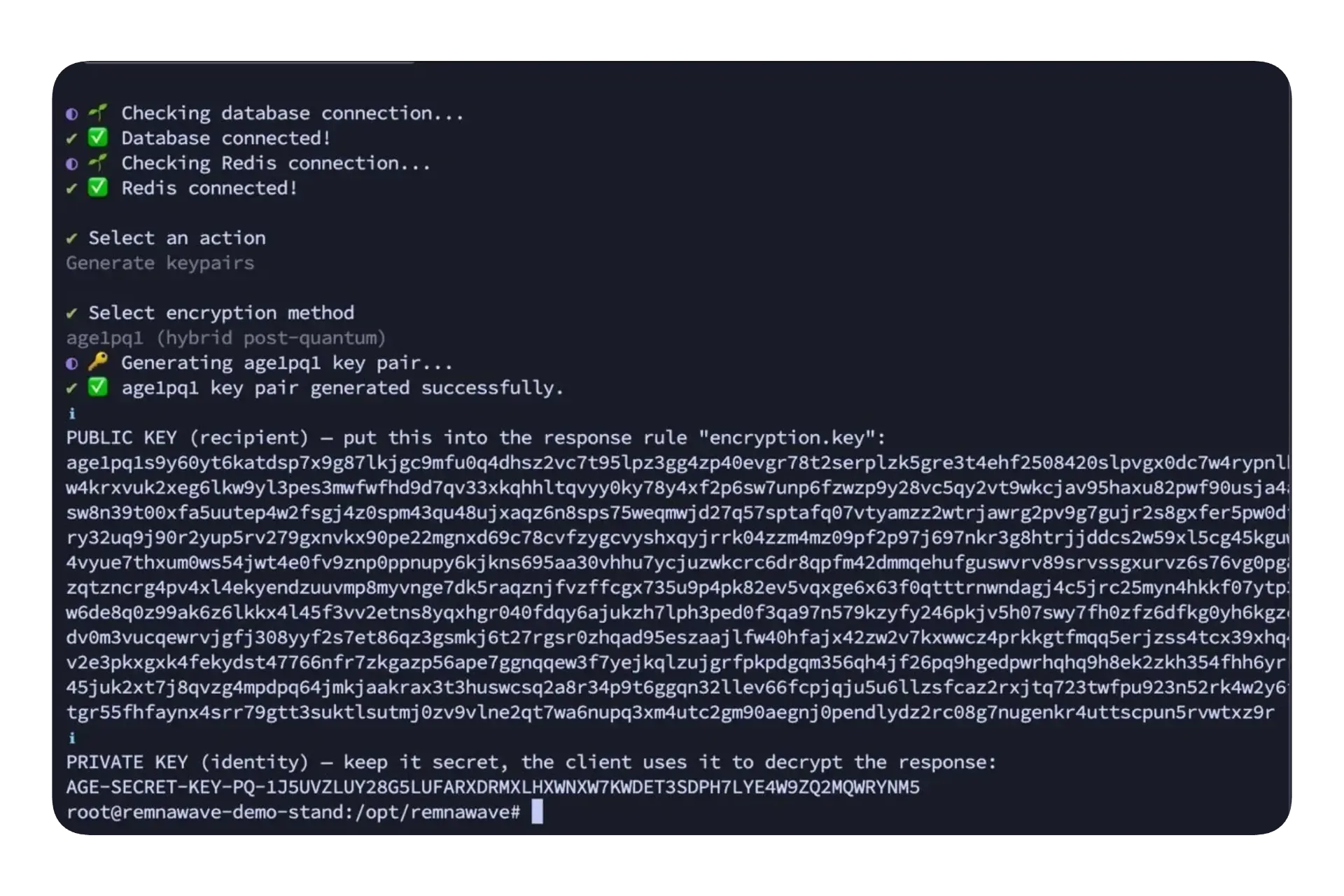
Key generation via Remnawave CLI
-
Run the CLI:
Terminal window docker exec -it remnawave remnawave -
Select Generate keypairs → age1pq1 (hybrid post-quantum).
-
The CLI outputs:
- PUBLIC KEY (
age1pq1…) — paste into theencryption.keyfield of the response rule. - PRIVATE KEY (
AGE-SECRET-KEY-PQ-1…) — give to the client to enter in Prizrak-Box settings.
- PUBLIC KEY (
Setting up Remnawave
Section titled “Setting up Remnawave”Step 1 — Create a response rule
Section titled “Step 1 — Create a response rule”In the Remnawave admin panel go to Response Rules and create a new rule. Add it at the top of the list so it takes priority over other rules.
Use the following JSON as a starting template and fill in your values:
{ "name": "Prizrak-Box", "description": "Prizrak-Box for Desktop & Android — age encrypted config", "enabled": true, "operator": "AND", "conditions": [ { "headerName": "user-agent", "operator": "CONTAINS", "value": "Clash-Meta/Prizrak-Box (", "caseSensitive": false } ], "responseType": "MIHOMO", "responseModifications": { "encryption": { "method": "age1pq1", "key": "age1pq1…" } }}| Field | What to put there |
|---|---|
responseType | MIHOMO — response type for mihomo config (encryption is set separately via responseModifications) |
responseModifications.encryption.method | age1pq1 for post-quantum key or age1 for classic X25519 |
responseModifications.encryption.key | The public key (age1pq1… or age1…) generated in the previous step |
Step 2 — Disable the plain /mihomo endpoint
Section titled “Step 2 — Disable the plain /mihomo endpoint”Once encryption is active, disable plain-text access to the mihomo config so clients cannot bypass encryption by hitting /mihomo directly.
In the same response rule, add the settings field before rules:
{ ... "settings": { "disableSubscriptionAccessByPath": true }, "rules": [ ... ]}This disables /json, /stash, /mihomo, and similar plain-text endpoints for all users in the panel.
Configuring Prizrak-Box
Section titled “Configuring Prizrak-Box”After generating the key pair, enter the secret key in the client:
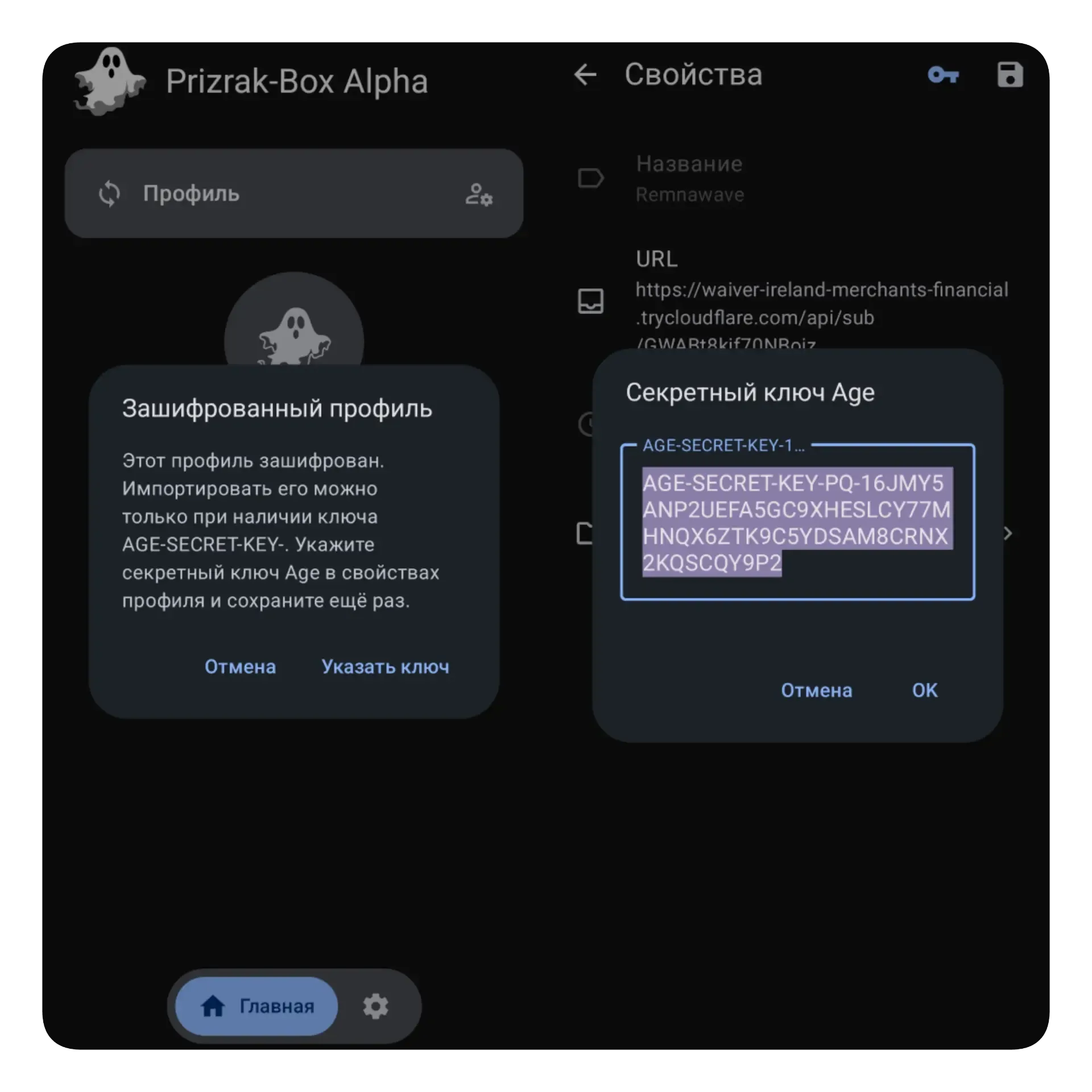
Prizrak-Box Desktop — click the key icon in the bottom-left corner to activate the secret key input field, paste AGE-SECRET-KEY-PQ-1…, and click Confirm to add the profile.
Prizrak-Box Android — tap the key icon in the top-right corner to activate the secret key input field, paste AGE-SECRET-KEY-PQ-1…, and tap the save profile icon.